Facebook sign-in with Embedded Wallets
Facebook Login lets users authenticate with a Facebook account. Choose the default connection for the quickest setup, or configure a custom connection when you need your own Facebook app, consent screen, or identity provider.
Default Facebook sign-in
The default connection uses the Facebook OAuth credentials managed by Embedded Wallets. You don't need a Meta for Developers app.
Caveats
- The Facebook consent screen identifies the OAuth application managed by Embedded Wallets, not your dapp.
- You can't change the Facebook application configuration, such as its scopes or branding, because you don't own the credentials.
- The default connection and a custom connection are separate connections, so they produce different wallet addresses for the same person unless you link them with a group connection.
Configure the default connection
- Open your project in the MetaMask Developer Dashboard.
- Select Social Connections.
- Enable Facebook.
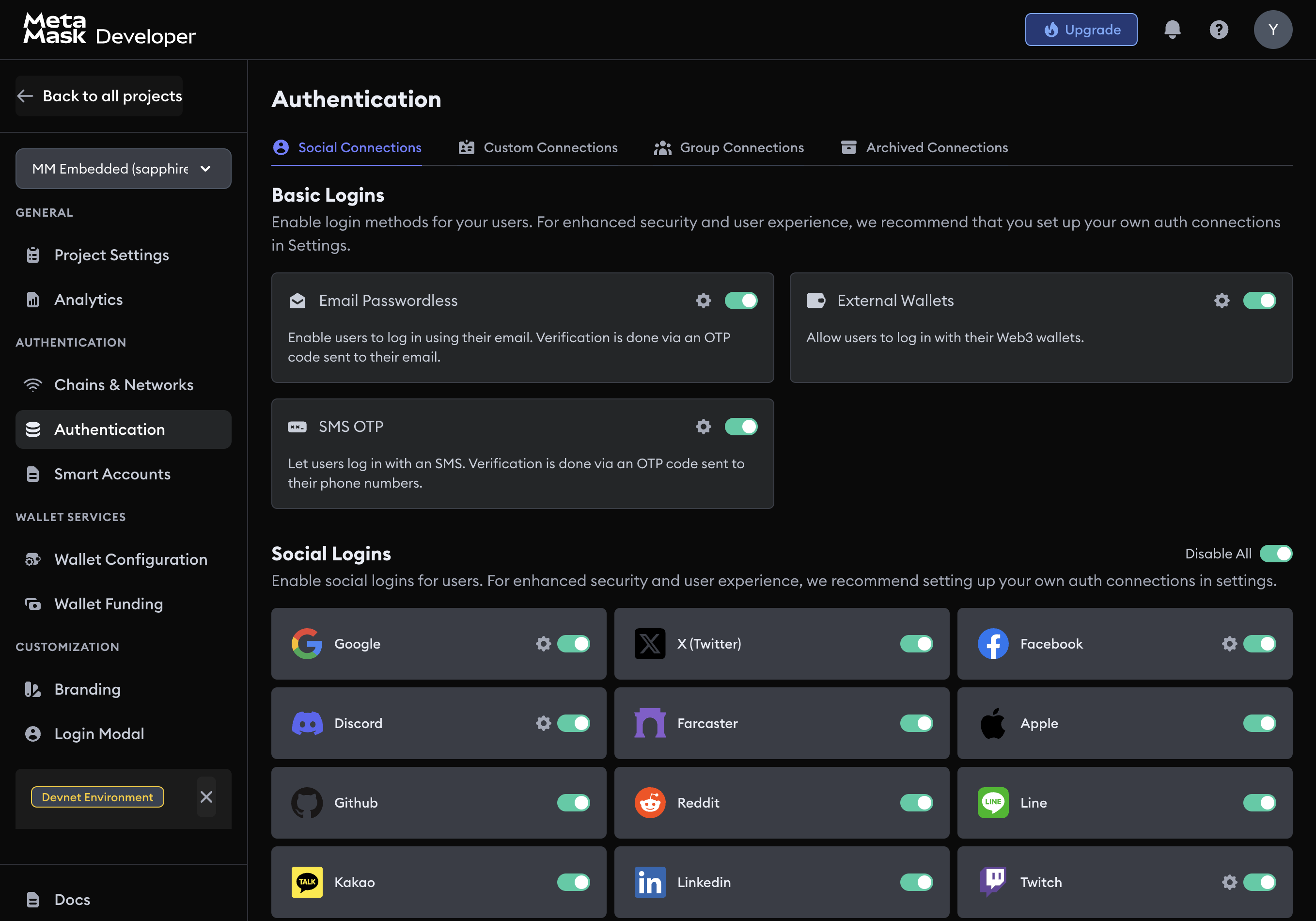
The SDK reads the connection from the dashboard. You don't need to add Facebook credentials to your SDK configuration.
Custom Facebook sign-in
Use a custom connection when the Facebook authorization belongs to your dapp or an identity platform you control. You can register a Facebook App ID and App Secret on the social connection, or run Facebook through Auth0, Firebase, Amazon Cognito, or your own backend.
Decide between the default and a custom connection before you onboard users. Moving from the default Facebook connection to a custom Facebook, Auth0, Firebase, Amazon Cognito, or JWT connection changes every user's wallet address unless both connections are in a group connection with matching user identifiers.
Your Facebook app
-
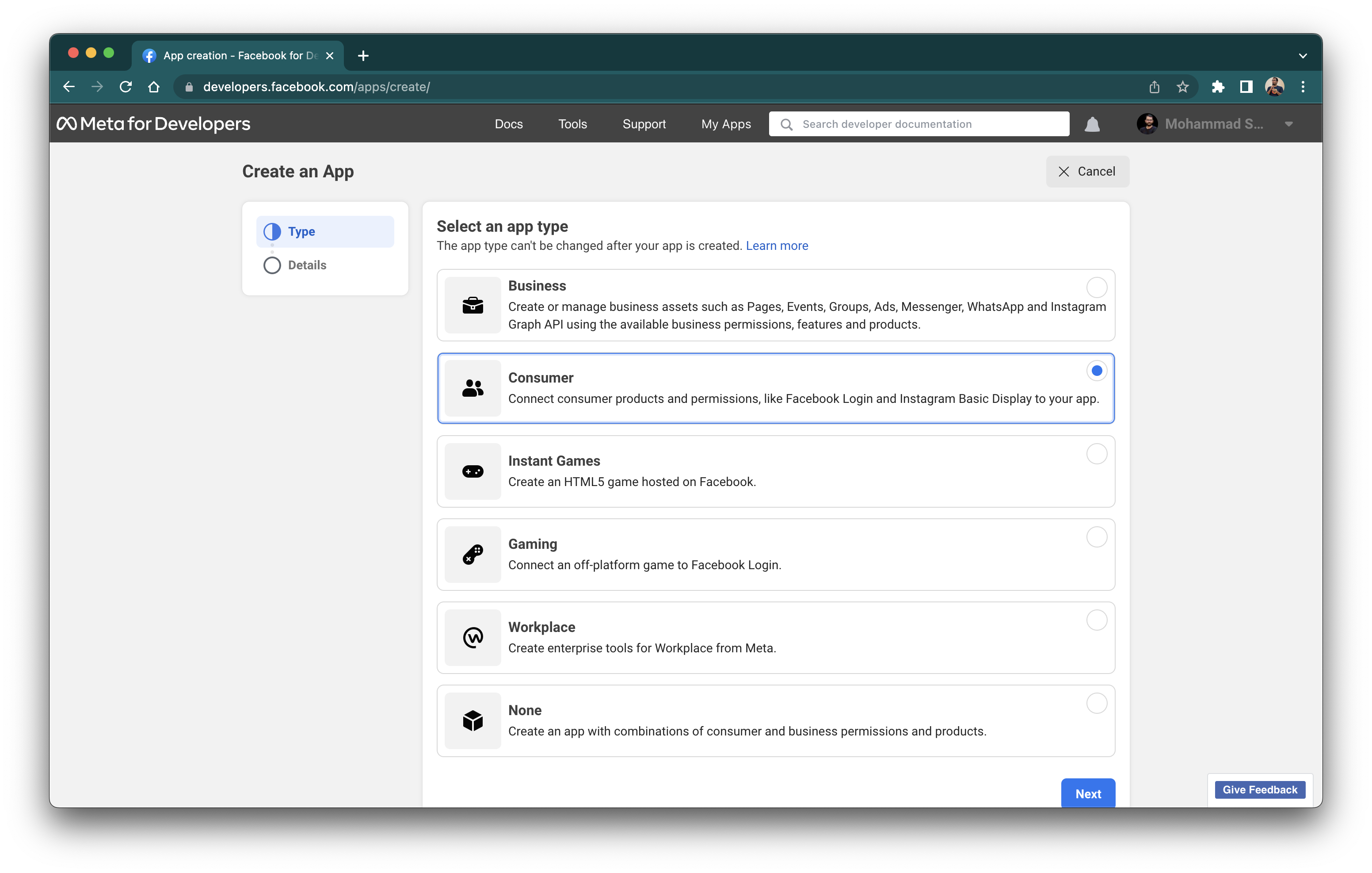
Create a Facebook app and select Consumer so you can use Facebook Login.
-
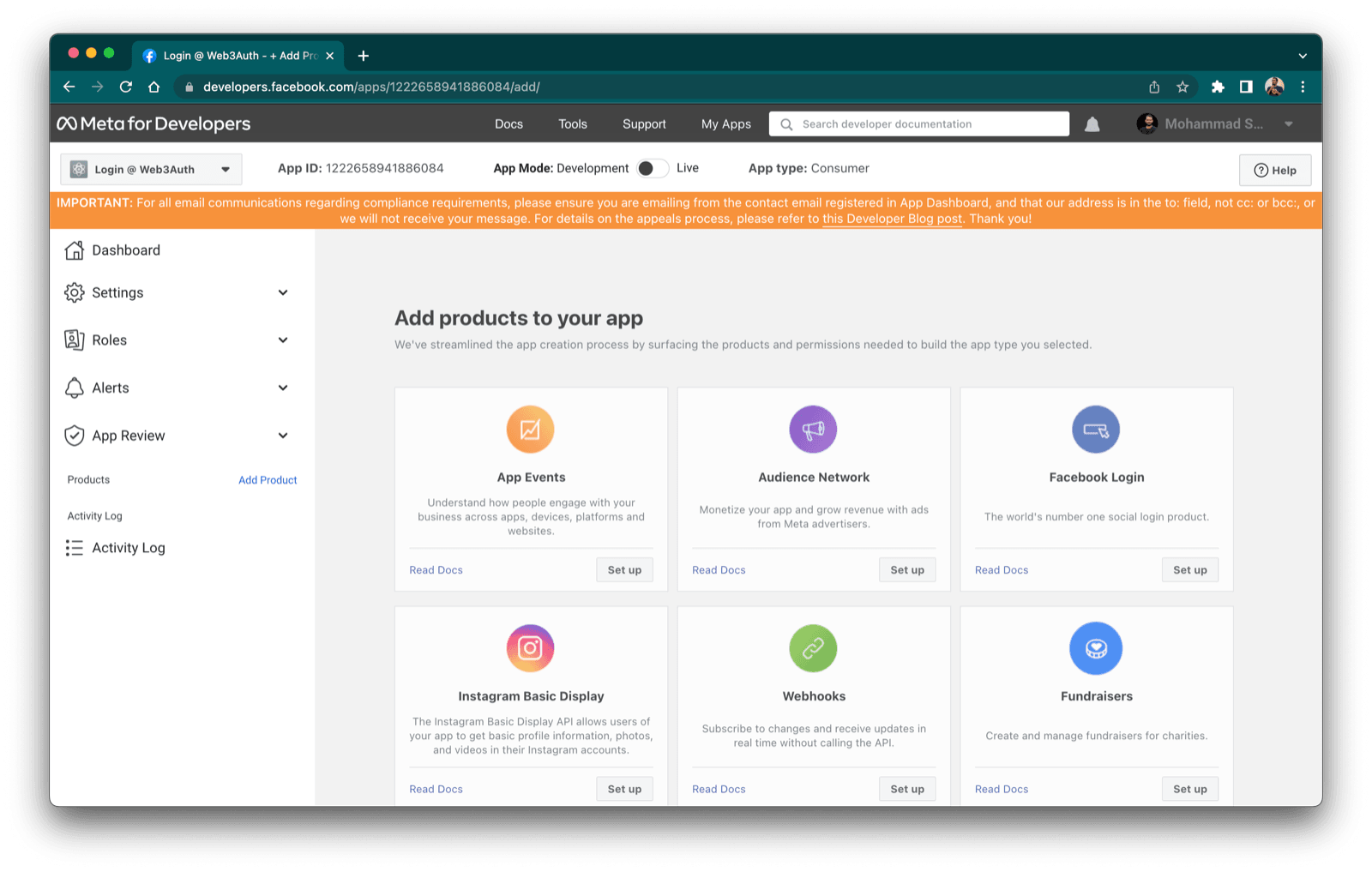
Set up Facebook Login on the app.
-
Add
https://auth.web3auth.io/authas a Valid OAuth Redirect URI.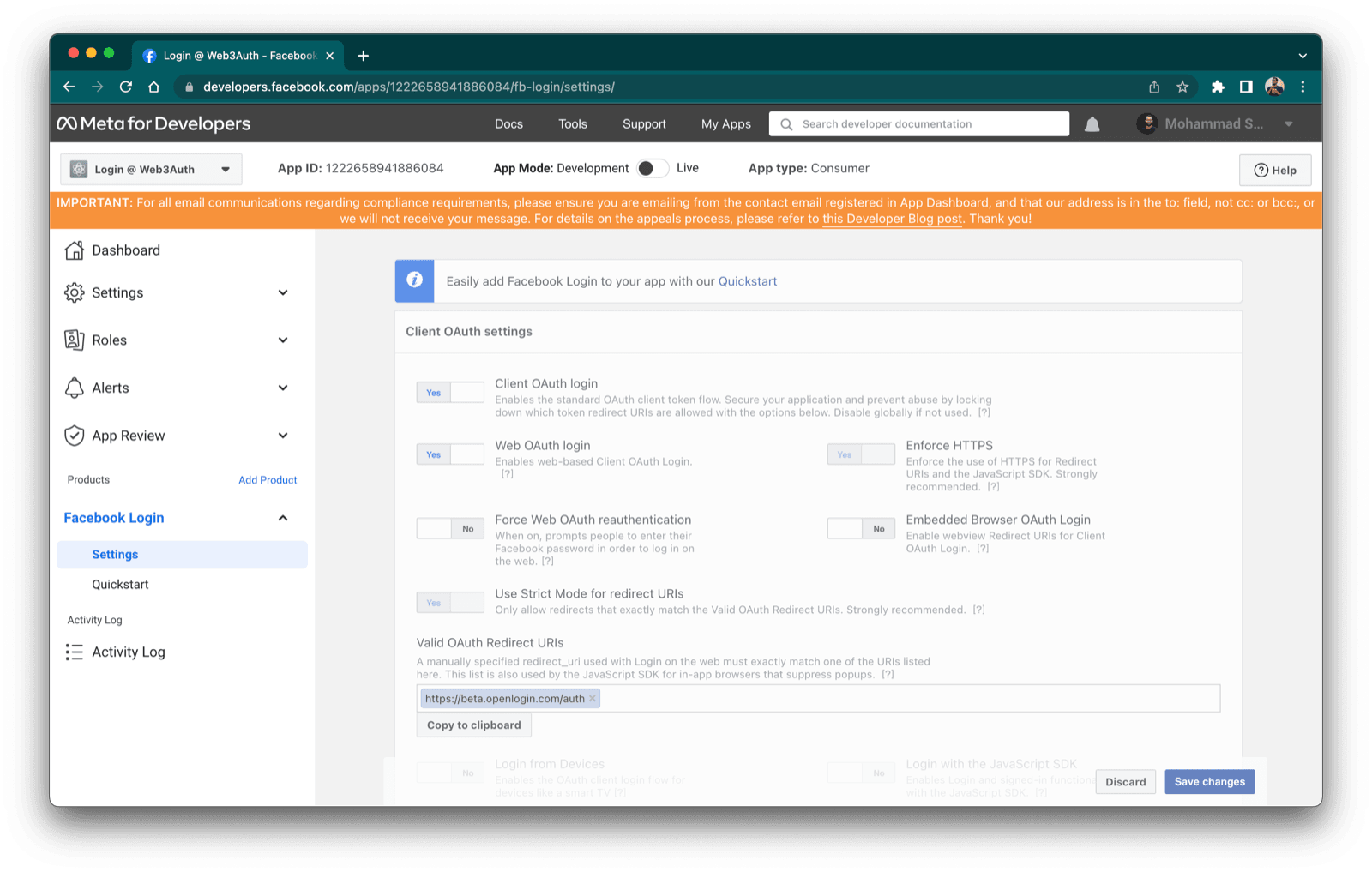
-
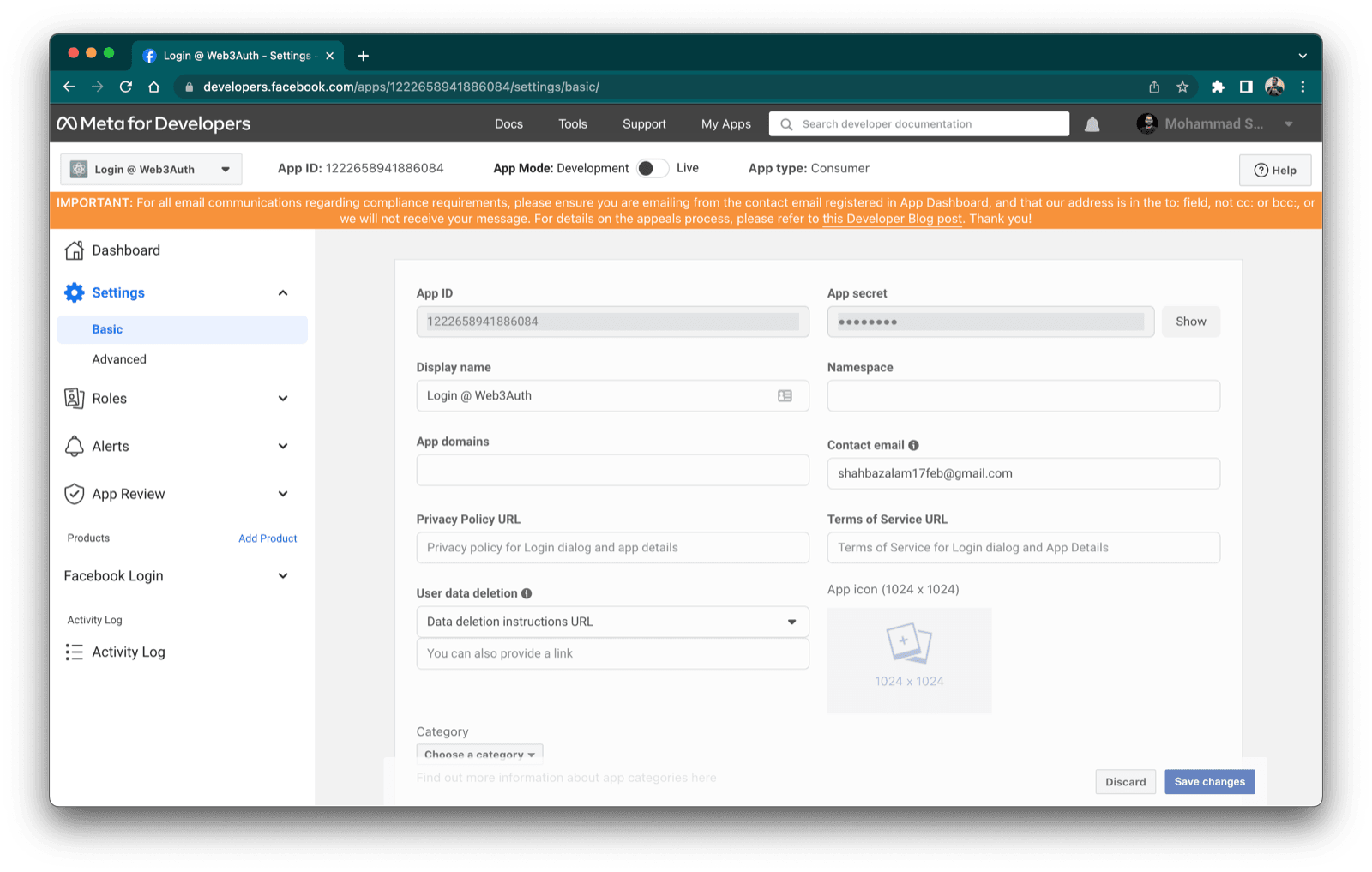
Copy the App ID and App Secret from Settings > Basic.
-
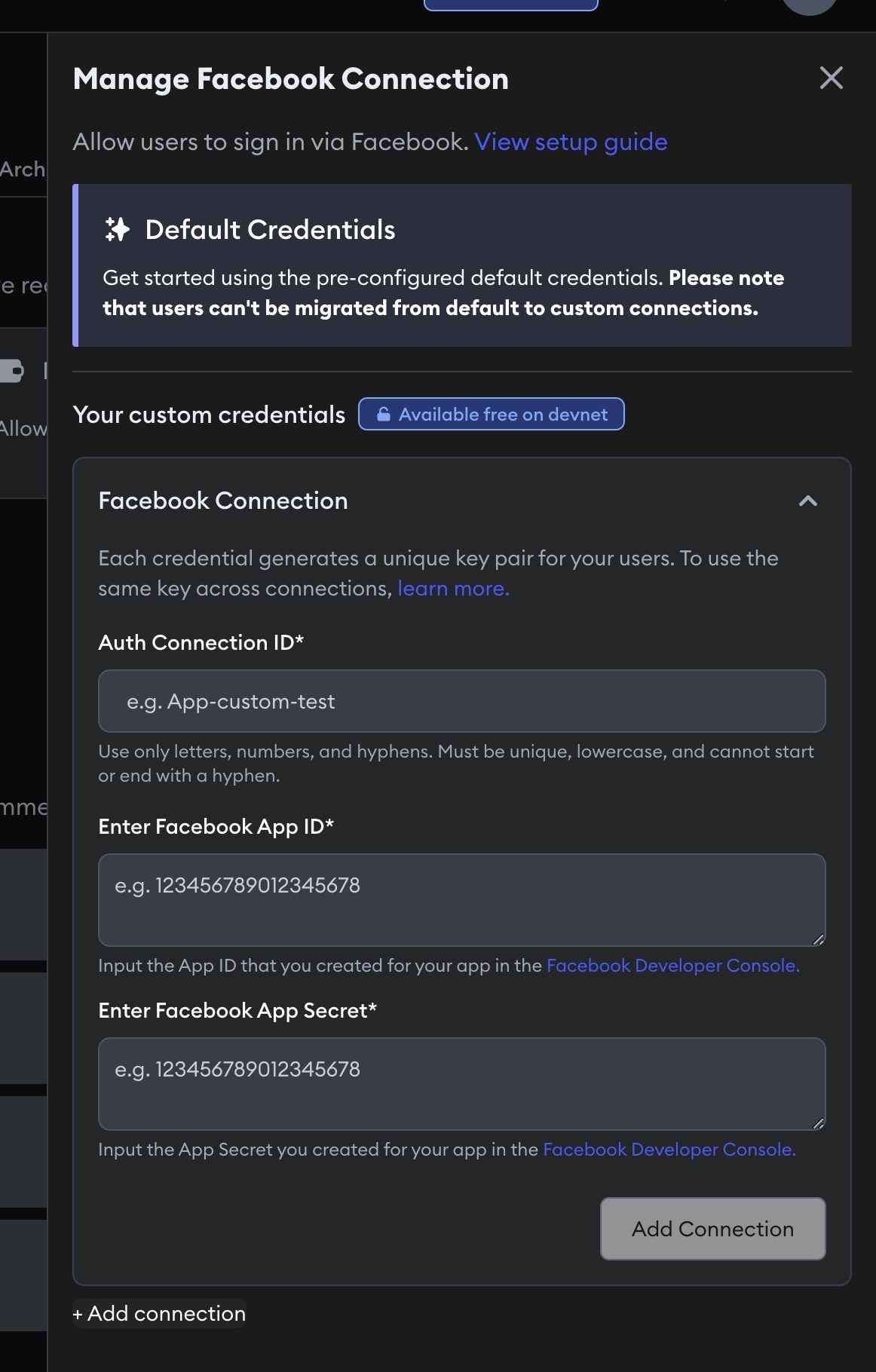
In the MetaMask Developer Dashboard, open Social Connections, select the settings icon next to Facebook, and enter an Auth Connection ID, the Facebook App ID, and the Facebook App Secret.
Call Embedded Wallets with AUTH_CONNECTION.FACEBOOK and that Auth Connection ID.
Auth0
- Configure Facebook as a social connection in Auth0.
- Create an Auth0 connection in the MetaMask Developer Dashboard.
- For an implicit flow, call Embedded Wallets with the Auth0 connection ID and set the Auth0
connection name to
facebook. - For a JWT flow, authenticate with the Auth0 SDK, retrieve its raw ID token, and pass that token to Embedded Wallets.
Firebase Authentication
- Enable Facebook sign-in in Firebase.
- Create a Firebase connection in the MetaMask Developer Dashboard.
- Sign the user in with the Firebase SDK and obtain a fresh Firebase ID token.
- Pass the Firebase ID token and your Firebase connection ID to Embedded Wallets using the JWT flow.
Amazon Cognito
- Configure Facebook as a social identity provider in Amazon Cognito.
- Create an Amazon Cognito connection in the MetaMask Developer Dashboard.
- Authenticate through Cognito, obtain a fresh Cognito ID token, and pass it to Embedded Wallets using the JWT flow.
Your own backend
- Complete Facebook Login in your client and send the access token or Facebook-limited login token to your backend.
- Validate the token with Facebook's Graph API or JWKS before trusting the identity.
- Issue a fresh JWT with an
iatno more than 60 seconds old and expose the signing public key through a JSON Web Key Set (JWKS) endpoint. - Create a custom JWT connection that validates your issuer, audience, JWKS, and user identifier.
- Pass your JWT and custom connection ID to Embedded Wallets.
Don't send a Facebook App Secret to a client application.
Group Facebook connections
A group connection gives the same person one wallet address across several login methods.
Default Facebook, a native Facebook app, and Facebook through Auth0 or Firebase are separate
connections.
They produce different wallet addresses unless you group them and every connection in the group
uses the same JWT user identifier (email or an aligned sub).
Pass both the child connection ID and grouped connection ID when you bypass the modal:
await connectTo(WALLET_CONNECTORS.AUTH, {
  authConnection: AUTH_CONNECTION.CUSTOM,
  authConnectionId: '<FACEBOOK_AUTH_CONNECTION_ID>',
  groupedAuthConnectionId: '<GROUPED_AUTH_CONNECTION_ID>',
  idToken,
})
Usage examples
The implicit examples open a Facebook or Auth0 authorization flow. The JWT examples assume your Auth0, Firebase, Cognito, or backend integration has already returned a fresh ID token.
Default implicit flow
- React
- Vue
- JavaScript
- React Native
- Android
- iOS
- Flutter
- Unity
- Unreal Engine
import { AUTH_CONNECTION, WALLET_CONNECTORS } from '@web3auth/modal'
import { useWeb3AuthConnect } from '@web3auth/modal/react'

const { connectTo } = useWeb3AuthConnect()

await connectTo(WALLET_CONNECTORS.AUTH, {
  authConnection: AUTH_CONNECTION.FACEBOOK,
})
import { AUTH_CONNECTION, WALLET_CONNECTORS } from '@web3auth/modal'
import { useWeb3AuthConnect } from '@web3auth/modal/vue'

const { connectTo } = useWeb3AuthConnect()

await connectTo(WALLET_CONNECTORS.AUTH, {
  authConnection: AUTH_CONNECTION.FACEBOOK,
})
import { AUTH_CONNECTION, WALLET_CONNECTORS } from '@web3auth/modal'

await web3auth.connectTo(WALLET_CONNECTORS.AUTH, {
  authConnection: AUTH_CONNECTION.FACEBOOK,
})
import { AUTH_CONNECTION, useWeb3AuthConnect } from '@web3auth/react-native-sdk'

const { connectTo } = useWeb3AuthConnect()

await connectTo({
  authConnection: AUTH_CONNECTION.FACEBOOK,
})
val response = web3Auth.connectTo(
  LoginParams(AuthConnection.FACEBOOK)
)
let response = try await web3Auth.connectTo(
    loginParams: LoginParams(authConnection: .FACEBOOK)
)
final response = await Web3AuthFlutter.login(
  LoginParams(loginProvider: Provider.facebook),
);
var options = new LoginParams
{
    loginProvider = Provider.FACEBOOK
};

web3Auth.login(options);
FWeb3AuthLoginParams LoginParams;
LoginParams.LoginProvider = TEXT("facebook");

UWeb3AuthSDK::GetInstance()->Login(LoginParams);
Native custom implicit flow
Use these examples after you add your own client ID on the social connection in the dashboard. For Android and iOS, add the connection to authConnectionConfig during initialization. Flutter, Unity, and Unreal Engine currently use their platform's loginConfig; configure it by following the custom authentication guide for Flutter, Unity, or Unreal Engine.
- React
- Vue
- JavaScript
- React Native
- Android
- iOS
- Flutter
- Unity
- Unreal Engine
await connectTo(WALLET_CONNECTORS.AUTH, {
  authConnection: AUTH_CONNECTION.FACEBOOK,
  authConnectionId: '<AUTH_CONNECTION_ID>',
})
await connectTo(WALLET_CONNECTORS.AUTH, {
  authConnection: AUTH_CONNECTION.FACEBOOK,
  authConnectionId: '<AUTH_CONNECTION_ID>',
})
await web3auth.connectTo(WALLET_CONNECTORS.AUTH, {
  authConnection: AUTH_CONNECTION.FACEBOOK,
  authConnectionId: '<AUTH_CONNECTION_ID>',
})
await connectTo({
  authConnection: AUTH_CONNECTION.FACEBOOK,
  authConnectionId: '<AUTH_CONNECTION_ID>',
})
val response = web3Auth.connectTo(
  LoginParams(
    authConnection = AuthConnection.FACEBOOK,
    authConnectionId = "<AUTH_CONNECTION_ID>"
  )
)
let response = try await web3Auth.connectTo(
    loginParams: LoginParams(
        authConnection: .FACEBOOK,
        authConnectionId: "<AUTH_CONNECTION_ID>"
    )
)
final response = await Web3AuthFlutter.login(
  LoginParams(loginProvider: Provider.facebook),
);
var options = new LoginParams
{
    loginProvider = Provider.FACEBOOK
};

web3Auth.login(options);
Configure the custom social connection in Blueprint by following the Unreal Engine custom authentication guide.
Auth0 implicit flow
These examples use the Auth0 custom connection configured for your SDK. Replace the connection ID and domain with your Auth0 values. For Android and iOS, add the connection to authConnectionConfig during initialization. Flutter, Unity, and Unreal Engine currently use their platform's loginConfig; configure it by following the custom authentication guide for Flutter, Unity, or Unreal Engine.
- React
- Vue
- JavaScript
- React Native
- Android
- iOS
- Flutter
- Unity
- Unreal Engine
await connectTo(WALLET_CONNECTORS.AUTH, {
  authConnection: AUTH_CONNECTION.CUSTOM,
  authConnectionId: '<AUTH0_CONNECTION_ID>',
  extraLoginOptions: {
    connection: 'facebook',
  },
})
await connectTo(WALLET_CONNECTORS.AUTH, {
  authConnection: AUTH_CONNECTION.CUSTOM,
  authConnectionId: '<AUTH0_CONNECTION_ID>',
  extraLoginOptions: {
    connection: 'facebook',
  },
})
await web3auth.connectTo(WALLET_CONNECTORS.AUTH, {
  authConnection: AUTH_CONNECTION.CUSTOM,
  authConnectionId: '<AUTH0_CONNECTION_ID>',
  extraLoginOptions: {
    connection: 'facebook',
  },
})
await connectTo({
  authConnection: AUTH_CONNECTION.CUSTOM,
  authConnectionId: '<AUTH0_CONNECTION_ID>',
  extraLoginOptions: {
    connection: 'facebook',
  },
})
val response = web3Auth.connectTo(
  LoginParams(
    authConnection = AuthConnection.CUSTOM,
    authConnectionId = "<AUTH0_CONNECTION_ID>",
    extraLoginOptions = ExtraLoginOptions(
      domain = "https://<AUTH0_DOMAIN>",
      connection = "facebook"
    )
  )
)
let response = try await web3Auth.connectTo(
    loginParams: LoginParams(
        authConnection: .CUSTOM,
        authConnectionId: "<AUTH0_CONNECTION_ID>",
        extraLoginOptions: ExtraLoginOptions(
            domain: "https://<AUTH0_DOMAIN>",
            connection: "facebook"
        )
    )
)
final response = await Web3AuthFlutter.login(
  LoginParams(
    loginProvider: Provider.jwt,
    extraLoginOptions: ExtraLoginOptions(
      domain: 'https://<AUTH0_DOMAIN>',
      verifierIdField: 'sub',
      connection: 'facebook',
    ),
  ),
);
var options = new LoginParams
{
    loginProvider = Provider.JWT,
    extraLoginOptions = new ExtraLoginOptions
    {
        domain = "https://<AUTH0_DOMAIN>",
        verifierIdField = "sub",
        connection = "facebook"
    }
};

web3Auth.login(options);
The current Unreal Engine SDK documentation provides this flow through Blueprint configuration, not a verified C++ example. Configure the Auth0 connection by following the Unreal Engine custom authentication guide.
JWT flow
Obtain a fresh ID token from your identity aggregator or backend before calling Embedded Wallets. The token issuer and claims must match the custom connection in the dashboard.
- React
- Vue
- JavaScript
- React Native
- Android
- iOS
- Flutter
- Unity
- Unreal Engine
- Node.js
const idToken = await getIdToken()

await connectTo(WALLET_CONNECTORS.AUTH, {
  authConnection: AUTH_CONNECTION.CUSTOM,
  authConnectionId: '<CUSTOM_CONNECTION_ID>',
  idToken,
})
const idToken = await getIdToken()

await connectTo(WALLET_CONNECTORS.AUTH, {
  authConnection: AUTH_CONNECTION.CUSTOM,
  authConnectionId: '<CUSTOM_CONNECTION_ID>',
  idToken,
})
const idToken = await getIdToken()

await web3auth.connectTo(WALLET_CONNECTORS.AUTH, {
  authConnection: AUTH_CONNECTION.CUSTOM,
  authConnectionId: '<CUSTOM_CONNECTION_ID>',
  idToken,
})
const idToken = await getIdToken()

await connectTo({
  authConnection: AUTH_CONNECTION.CUSTOM,
  authConnectionId: '<CUSTOM_CONNECTION_ID>',
  idToken,
})
val response = web3Auth.connectTo(
  LoginParams(
    authConnection = AuthConnection.CUSTOM,
    authConnectionId = "<CUSTOM_CONNECTION_ID>",
    idToken = idToken
  )
)
let response = try await web3Auth.connectTo(
    loginParams: LoginParams(
        authConnection: .CUSTOM,
        authConnectionId: "<CUSTOM_CONNECTION_ID>",
        idToken: idToken
    )
)
final response = await Web3AuthFlutter.login(
  LoginParams(
    loginProvider: Provider.jwt,
    extraLoginOptions: ExtraLoginOptions(
      id_token: idToken,
    ),
  ),
);
var options = new LoginParams
{
    loginProvider = Provider.JWT,
    extraLoginOptions = new ExtraLoginOptions
    {
        id_token = idToken
    }
};

web3Auth.login(options);
The current Unreal Engine SDK documentation doesn't provide a verified C++ JWT example. Configure the JWT connection and login in Blueprint by following the Unreal Engine custom authentication guide.
const result = await web3auth.connect({
  authConnectionId: '<CUSTOM_CONNECTION_ID>',
  idToken,
})